EphemerAl
EphemerAl (EphemerAI UI): A Simple Self-Hosted Chat Interface for Local AI with Ollama that Accepts Documents and Images
EphemerAl is a lightweight, open-source web interface (user-facing brand: EphemerAI) for interacting with local LLMs on your hardware via Ollama. I designed it for my day job to help keep our team’s sensitive info off cloud services, and to provide a modern AI experience to staff without the per-user cost required to achieve equivalent capabilities online. The repository now targets Qwen3.6-35B-A3B through a stable local alias (ephemeral-default) that you create from qwen3.6:35b-a3b, and can still be retargeted to other models by changing one environment variable (LLM_MODEL_NAME).
While it wasn’t built for broad distribution, I’m sharing this generalized version in case it helps others looking for a local-only, account-free, multimodal LLM interface. . . whether to provide an operational tool, a staff learning environment, or bragging rights when friends visit on your home network.
View the source code on GitHub
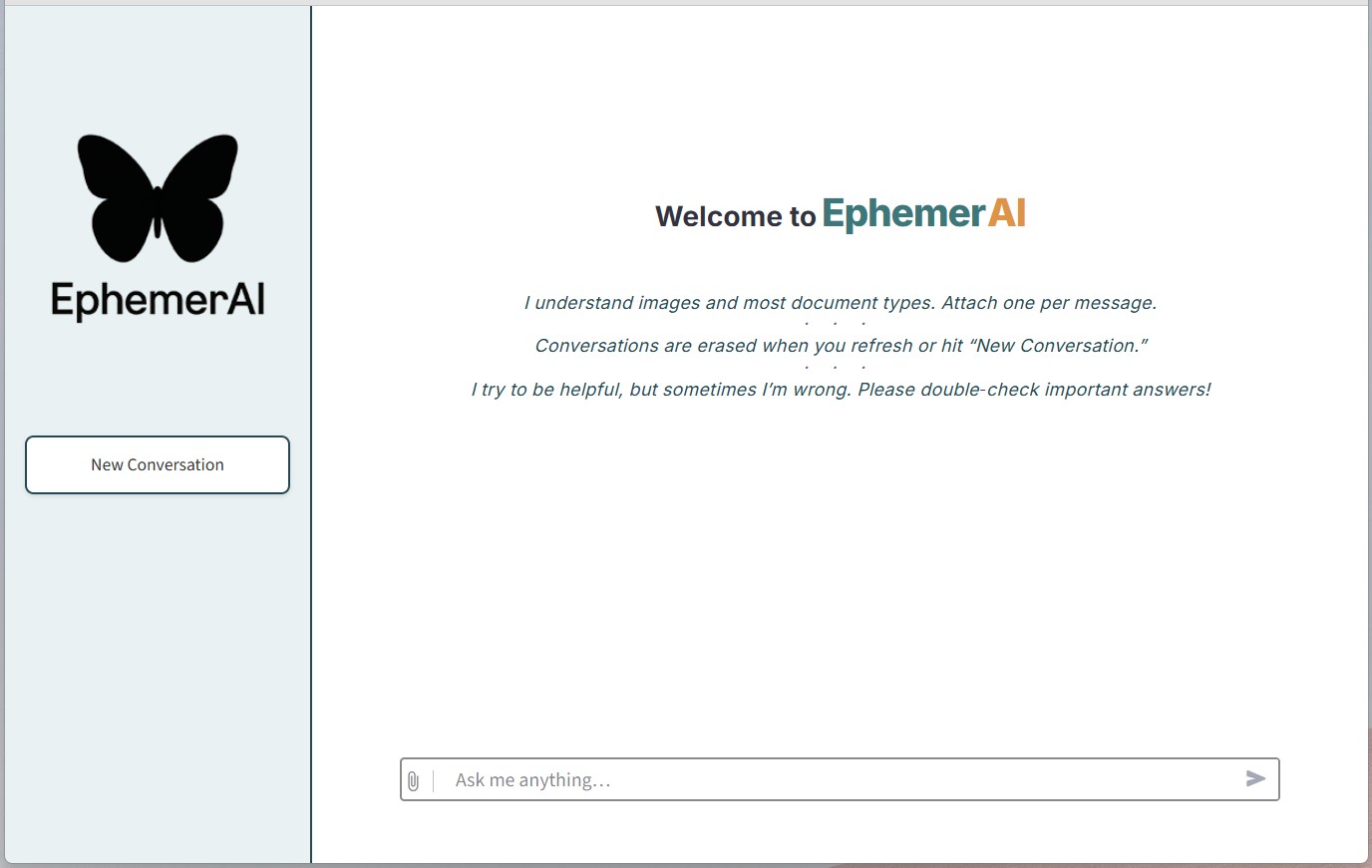
Core Features
- Local AI chat: Real-time chat against a local Ollama model.
- Document ingestion: Upload PDFs, Office docs, text files, and more (via Apache Tika).
- Upload guardrail: Each uploaded file is capped at 50 MB to prevent accidental oversized uploads.
- Image + text chat: If your selected model supports vision, image uploads are included in the request automatically.
- Streaming responses: Assistant output streams token-by-token.
- Ephemeral by default: Conversation state is in-memory for the session; no app-level database.
- Token/context safeguards: The app estimates prompt size and drops overflowing attachments before request failure where possible.
Default Model and Retargeting
Default target
- Model: Qwen3.6-35B-A3B
- Ollama backing tag:
qwen3.6:35b-a3b - App model name:
ephemeral-default
Using a stable local alias is intentional: it lets you pin runtime defaults (like context and generation parameters) in one place while the app consistently calls ephemeral-default.
Runtime assumptions in this repo
- 256K target context: set through alias Modelfile
num_ctx 262144. - q8 KV cache target: configured via Ollama environment variable in the deployment path.
- Non-thinking by default: requests use
reasoning_effort="none". - No default EphemerAl output cap: the app does not set
max_tokensunless you explicitly configureLLM_MAX_TOKENS. - Document budgeting reserve:
LLM_OUTPUT_RESERVE_TOKENSkeeps response headroom while loading documents into context; it is not an output cap. - OpenAI SDK client controls: defaults are
LLM_REQUEST_TIMEOUT_S=1800andLLM_MAX_RETRIES=0for local long-running inference without hidden retries.
Retarget to a different model
Set LLM_MODEL_NAME to any available Ollama model tag or local alias:
- Docker Compose: edit
docker-compose.yml - Native/service deployment: set environment variable for the app service
The app performs model capability/context detection at runtime via Ollama (/api/show) so behavior remains adaptive across models.
Privacy Notes
EphemerAl is designed to minimize data retention:
- No database: Conversations live in the Streamlit server process memory (
st.session_state) for your browser session and are not persisted to disk by this app. - Session-scoped caching: Document parsing results are cached per-session for performance, but cleared when you start a new conversation or close your browser.
- Container isolation: Tika and the Streamlit app use tmpfs for
/tmp, so temporary files stay in RAM. - Optional log suppression: For hardened deployments, container logging can be disabled entirely (see docker-compose.yml comments).
Note that browser caching behavior depends on your browser settings and cache-control headers. For maximum privacy on shared machines, use private/incognito browsing or clear browser data after use.
If you enable a shared Ollama API backend, requests made directly to Ollama bypass the EphemerAl UI/session layer; privacy and logging behavior for those requests depends on the external client and Ollama deployment settings, not EphemerAl session behavior.
Network Security Note
EphemerAl is designed for trusted local networks (home, office LAN) and does not implement authentication or transport encryption. The Streamlit container disables CORS and XSRF protection to allow straightforward LAN access. Do not expose this application to the public internet without adding a reverse proxy with authentication and TLS.
Technical Stack
- Python 3.11 + Streamlit 1.56.0
- Ollama API (OpenAI-compatible endpoint for chat)
- Apache Tika server
- Docker Compose (for the included deployment path)
- Pinned Ollama container image in compose:
ollama/ollama:0.21.0 - Pinned Apache Tika container image in compose:
apache/tika:3.3.0.0-full
Hardware Planning (honest baseline)
Qwen3.6-35B-A3B is a large model and should be planned like one.
- Target baseline: 32 GB total VRAM for this deployment (including multi-GPU setups such as 2x 16 GB cards).
- Operator validation required: verify actual context realization and GPU residency with
ollama psafter deployment. - CPU-only fallback: technically possible in some setups but usually too slow for interactive use.
If this model is too heavy for your machine, retarget LLM_MODEL_NAME to a smaller local model.
System Requirements
To run this interface effectively, the following specifications are recommended.
- Operating System: Windows 11 Pro or Enterprise, fully updated. WSL will be installed as part of setup (if not already present).
- Graphics Processing Unit: One or more discrete NVIDIA GPU(s), preferably from the 30-series or later. Plan for 32 GB total VRAM for Qwen3.6-35B-A3B (including multi-GPU combinations such as 2x 16 GB).
- Nvidia Driver: The most recent WHQL-certified NVIDIA GPU driver. Optional components may be omitted.
- Additional Note: If available, connect display to integrated graphics to allocate more VRAM to the NVIDIA GPU(s).
Deployment
Use the step-by-step guide:
Migration note for pre-Qwen installs
If your current stack still points at any older model tag, recreate or update your local ephemeral-default alias to point to qwen3.6:35b-a3b using the deployment guide, then confirm docker-compose.yml uses LLM_MODEL_NAME=ephemeral-default.
Shared Ollama API Backend (optional)
- Raw Ollama remains internal by default in this stack.
- Ollama cloud features are disabled by default (
OLLAMA_NO_CLOUD=1) to keep this deployment local-only/privacy-aligned. - If you intentionally want shared API access, use the
docker-compose.api.ymloverride to expose port11434. - External OpenAI-compatible clients should use:
model: "ephemeral-default"reasoning_effort: "none"temperature: 0.7top_p: 0.8presence_penalty: 1.5
- Important: raw Ollama exposure in this stack does not add app-level authentication by itself.
Accessing EphemerAl
- Local:
http://localhost:8501 - Network:
http://<host-ip>:8501
UI Validation Checklist (Streamlit 1.56)
After deployment (or after UI updates), run this quick manual checklist in a browser:
- Open the app and confirm the empty welcome screen renders before any chat messages.
- Send a text-only prompt and confirm normal response streaming.
- Upload a supported document (for example, PDF or DOCX) and confirm document chat still works.
- Upload an image and confirm behavior is model-aware:
- If the selected model supports vision, the image is accepted and included.
- If the selected model does not support vision, the UI shows a clear warning and continues text chat.
- Click New chat and confirm prior messages/attachments are cleared from the current session.
- After at least one exchanged message, click Copy conversation and confirm clipboard copy works.
- Temporarily stop Ollama or Tika and confirm the app UI still renders with backend-unavailable guidance.
- Narrow the browser window (or test on mobile) and confirm basic sidebar/chat usability.
Stopping the Application
Execute the following in an Administrator PowerShell window:
wsl --shutdown
To restart, either run wsl or reboot the system if you have the startup script installed.
Support
This project is provided as a resource for the community as-is. I hope it solves a problem or provides value outside my environment.
If you run into issues, consider submitting error details, including screenshots and system files, to an AI assistant for guidance. This isn’t meant to be snark, it’s amazing how well the big reasoning models can troubleshoot.
License:
MIT - (At least the parts of this stack that are mine to license)